
DNS, mail, and reachability · An active score on every row
Check who's still active. Drop the dead before import.
Upload your list. Operelio checks whether each company's website is live, reads the DNS, mail, and reachability signals behind it, and gives you a 0 to 100 active score on every row. So the dead and defunct companies never make it into your CRM.
Pro from $39 a month. A run costs one job, no per-row charges.
What you get back
A live-or-dead verdict on every row, with the signals behind it
The verdict
A band on every row
Active, uncertain, or inactive. Active looks live. Inactive is dead or unreachable. Uncertain is the in-between, where the signals are mixed and a human should glance at it. Filter the file to one band in a click.
A 0 to 100 active score
Not just a label. Every row gets a number, so you can set your own cut. Keep everything above 70, send the rest to review, drop the floor. The band is derived from this score, so the two always agree.
A plain-language reason
A short note that names why each row scored the way it did, like "does not resolve", "parked page", or "resolves, mail, 200". No decoding a status code to work out what happened.
Honest about the unclear ones
Rows with no website are marked unknown and counted separately, never scored as dead. Sites answering with mixed signals are scored uncertain rather than guessed at. Dead sites score inactive.
The signals behind the score
Each one is its own column, so you can see exactly what the score is built on and filter on any of them. Every signal is a reading of the website, not a claim about the company.
Domain resolves
Whether the domain answers in DNS at all. A domain that no longer resolves is the clearest sign a site is gone.
Mail server
Whether the domain has a mail server (an MX record). A live company that still receives mail usually keeps one set up.
HTTP status
The status the website returns when asked for its page: a clean 200, a redirect, an error, a refusal, or a timeout.
Final URL
The address the site lands on after any redirects. It flags a company that has moved to a new domain, or one that quietly forwards to a parking page.
Built on
The platform the site runs on, like Shopify or WordPress, when it can be detected. A live, maintained stack is a small positive signal.
TLS certificate
Whether the site has a valid certificate, an expired one, or none. An expired certificate often means nobody is minding the site any more.
Response speed
How quickly the site answered: fast, slow, or timed out. A site that barely answers is a borderline signal worth a look.
Parked flag
Whether the page is a parking or for-sale holder rather than a real site. A parked domain is a strong sign the company behind it is gone.
How to use it
Upload, check, keep the live ones
Upload your file
Drop in a CSV or Excel file. Operelio finds the website or domain column automatically. If there is more than one, you pick which to check.
contacts_export.csv
5,875 rows · Website column detected
Run the check
Click Run. Operelio checks each unique website once and reuses the result across every row that shares it. A run costs one job, with no per-row charges. Most files finish in a few minutes.
Keep the live companies
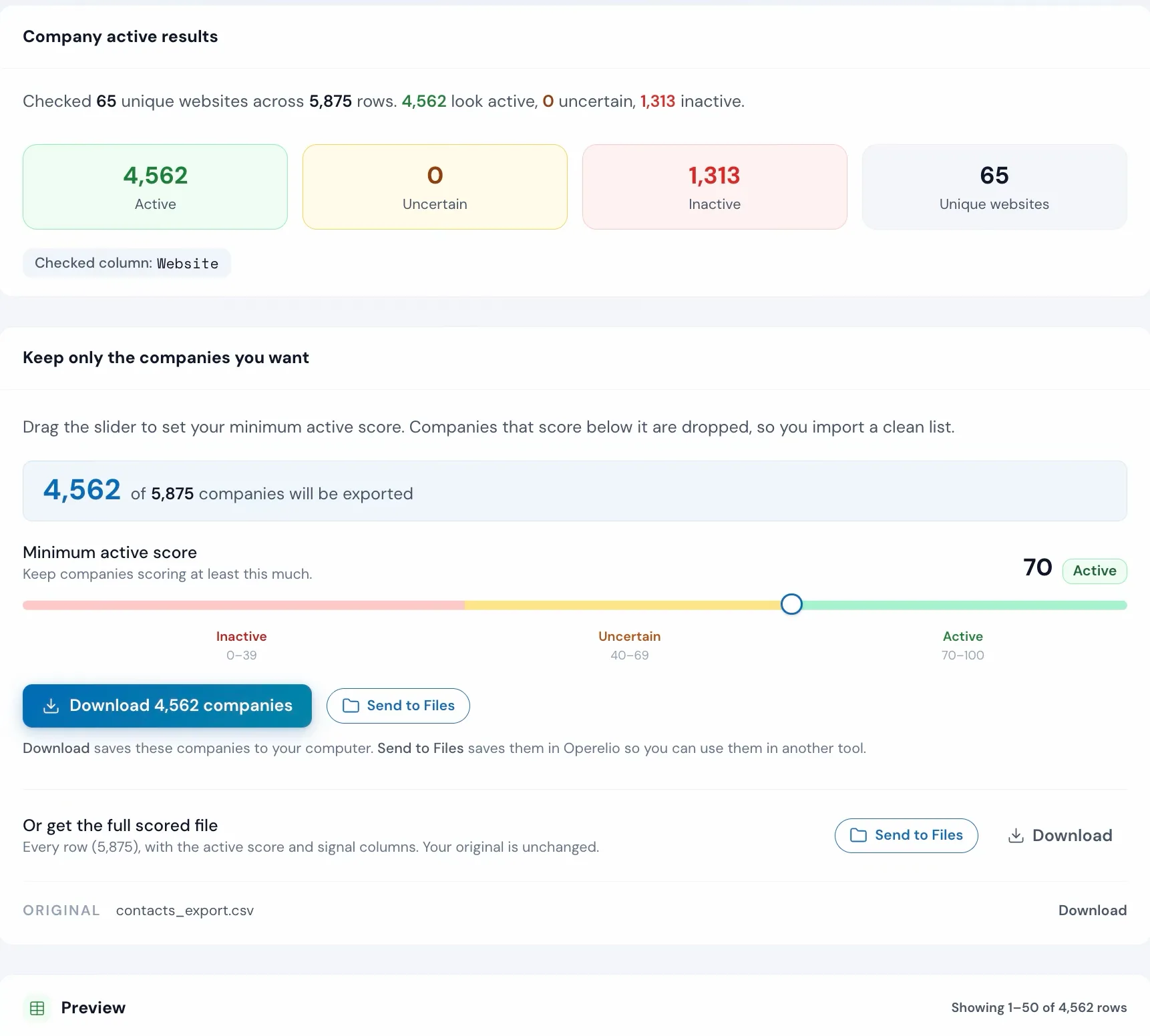
Get the scored file with the band, score, and signals on every row. Drag the slider to the score you want and export just those rows. Send the clean list to the Email Verifier or CRM Formatter.
4,562 active · ready to import
1,313 inactive dropped
More than a bulk run
Check one in a second, or cut a whole list with one slider
Instant single check
No upload, no jobPaste one domain into the box at the top of the tool and get its active score, band, and the signals behind it on the spot. No file, no job spent. Use it for a quick sanity check on a single company, or to spot-check a row the bulk run marked uncertain.
One-slider export
Original never changedOn the results page, drag one slider to the active score you are comfortable with and export just the rows at or above it. A toggle decides whether rows with no website come along. The full scored file stays in your history, untouched, so you can always re-cut at a different line.
The check never changes your data. It reads each website and writes the verdict and signals into new columns, leaving the addresses you uploaded exactly as they were.
The alternative
Importing a list with dead companies in it
This is what a stale list costs you once it's in the CRM.
Import the whole list
Cleanup later, every time
Dead records spread once they're in the system. Pulling them back out is slower than catching them at the door.
Check it first with Operelio
A clean list at the door
One run, one job. The dead companies are gone before they cost you a call, a credit, or a CRM seat.
Pricing
On every paid plan, one job per run
Company Active Check is included on Pro ($39 a month), Team ($99 a month), and Agency ($299 a month). A run costs one job from your monthly allowance, with no per-row credits and no per-domain charges, because the DNS, mail, and reachability checks don't call a paid outside service. The instant single-domain box doesn't spend a job at all.
Common questions
Company Active Check FAQ
What does Company Active Check check?
It checks whether each company's website is live and reachable. For every domain in your list it reads three things: whether the domain resolves in DNS, whether it has a mail server (an MX record), and whether the website answers an HTTP request. From those signals it works out a 0 to 100 active score and sorts each row into a band: active, uncertain, or inactive. It is a reachability check on the website, not a check on whether the business is registered or real.
Does this tell me the company is still in business?
No, and it does not claim to. Company Active Check tells you whether the website is live, which is a strong signal that a company is still operating, but it is not a company registry or a KYB check. A live site can belong to a dormant business, and a healthy company can have a slow or moved website. Read the score as "is this website live and reachable", then use your own judgment on the borderline rows. It is built to clear out the obviously dead and defunct ones in bulk, so the list you import is worth your time.
What are the three bands?
Active means the website resolves and answers cleanly, so it looks live. Inactive means the site is dead or unreachable: the domain does not resolve, nothing answers, or the page is parked or for sale. Uncertain sits in between, where the signals are mixed (for example the domain resolves but the site is slow to answer or returns an unusual status). The band comes straight from the 0 to 100 score, so you can sort, filter, and cut on either one.
What columns get added to my file?
Your original file with new columns added at the right. The headline columns are company_active (the band: active, uncertain, or inactive) and liveness_score (the 0 to 100 number), followed by liveness_reason, a short plain-language note that names the signals behind the verdict. Then come the signal columns: domain_resolves, mail_server, http_status, final_url (the address after any redirects, which flags a rebrand or a parked-elsewhere site), built_on (the platform the site runs on, like Shopify or WordPress, when it can be detected), tls_certificate, response_speed, and parked. You can sort and filter the file on any of these.
Is there a quick way to check a single domain?
Yes. The tool has an instant check box at the top. Type or paste one domain and you get its active score, band, and the signals behind it on the spot, with no file upload and no job spent. It is handy for a quick sanity check on one company before you run a whole list, or for spot-checking a row the bulk run marked uncertain.
How do I keep only the live companies?
On the results page, drag the one slider to the active score you are comfortable with and export just the rows at or above it. The full scored file is never changed; the slider only controls which rows the filtered download keeps. There is also a toggle for whether to keep or drop rows that had no website to check. So you can hand off a clean list of companies whose sites are live, while the original stays intact in your history.
What happens to rows with no website, or sites it cannot read clearly?
Rows with no website to check are marked unknown and counted on their own, separate from the scored rows, so a blank cell never gets scored as dead. Sites that do have a website but answer with genuinely mixed signals are scored uncertain, not guessed at, so a human can glance at them. Dead or unreachable sites are scored inactive. So every row with a website lands in active, uncertain, or inactive, and unknown is reserved for the rows that had nothing to check.
How long does a 10,000-row file take?
Most files finish in a few minutes. The tool checks each unique domain once and reuses the result across every row that shares it, so a list with many contacts at the same companies runs faster than its row count suggests. Larger files take longer but never sit in a queue, and the job lands in your notifications when it is done.
How am I billed for it?
Company Active Check is on Pro, Team, and Agency, and a run costs one job from your monthly job allowance, the same as most tools. There are no per-row credits and no per-domain charges, because the DNS, mail, and reachability checks do not call a paid outside service. The instant single-domain box does not spend a job at all.
When should I run it?
Run it early, before dedupe and before a CRM import, on any list where dead companies are a real risk: an aged list, a scraped list, a bought list, or one that has been sitting in a spreadsheet for a year. Cutting the dead and defunct companies first means you are not paying to dedupe, verify, or import rows that were never worth keeping. After it runs you can send the clean list straight into the Email Verifier or CRM Formatter.
Works well with
Want the full walkthrough? Read the Company Active Check guide →
Stop importing dead companies.
Upload your list, see which companies are still live, and keep just those. Company Active Check is on every paid plan.