
Automated lead flow for Sales, Marketing & RevOps
Messy spreadsheets in.
Clean CRM out.
Contacts land as spreadsheets. Operelio cleans, verifies and routes them into HubSpot, Salesforce or Pipedrive automatically, with approval built in. Or run any file through the same tools yourself.



The problem
It comes from everywhere.
None of it is ready.
Getting the data is the easy part. A client sends five files, each a different shape. A colleague drops an Excel file with merged cells and notes typed into the data. You pull contacts from three data providers and lose half the fields just combining them. And it keeps coming: the next event, the next list, the same client next week. The work is combining it, verifying it, and getting the fields that matter into your CRM, clean enough that it will take every row, every time.
 apollo-export.csv
 zoominfo (3).csv
The platform
Everything between spreadsheets and your CRM.
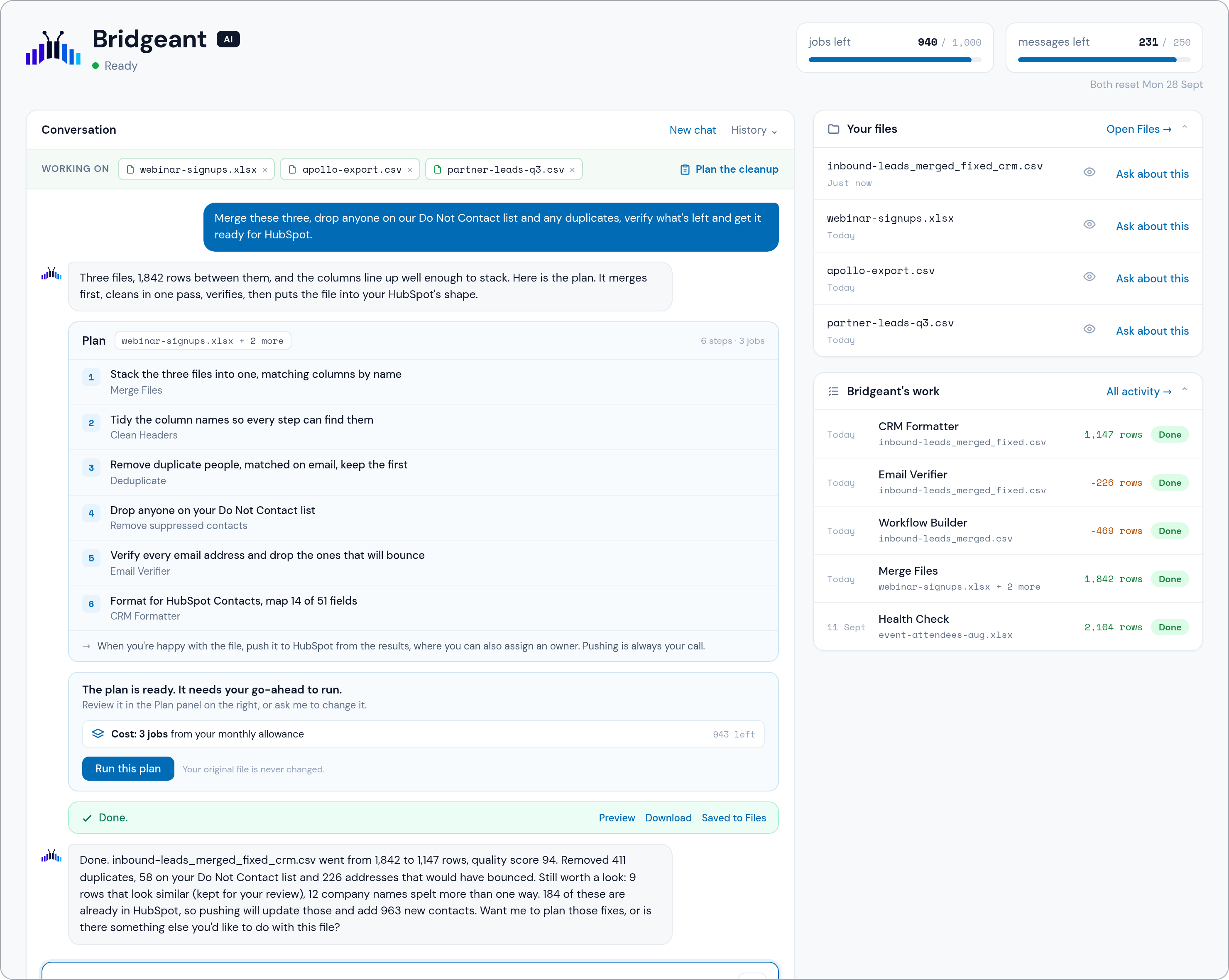
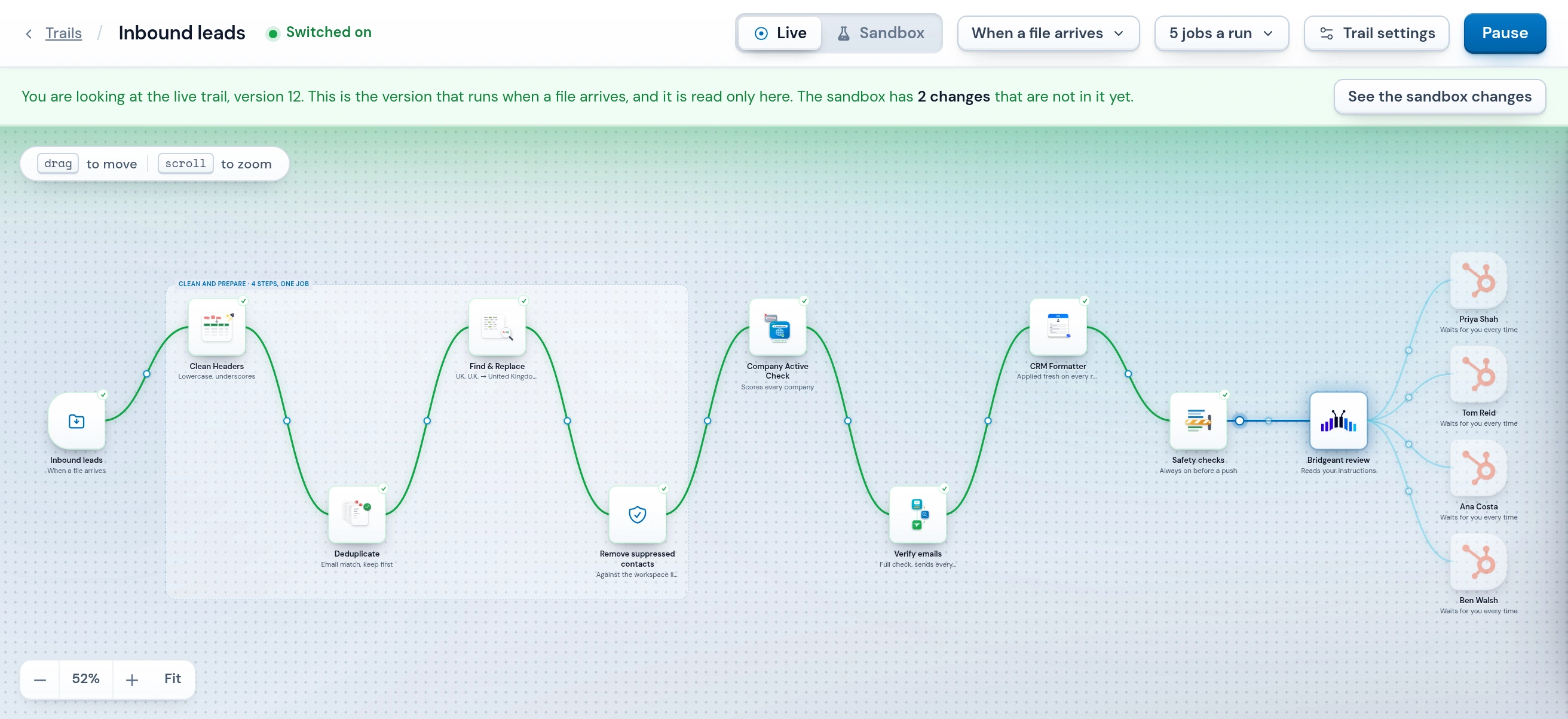
One place to clean, verify, map and push. Run the tools yourself, hand the work to Bridgeant, or use Trails to run it all automatically.
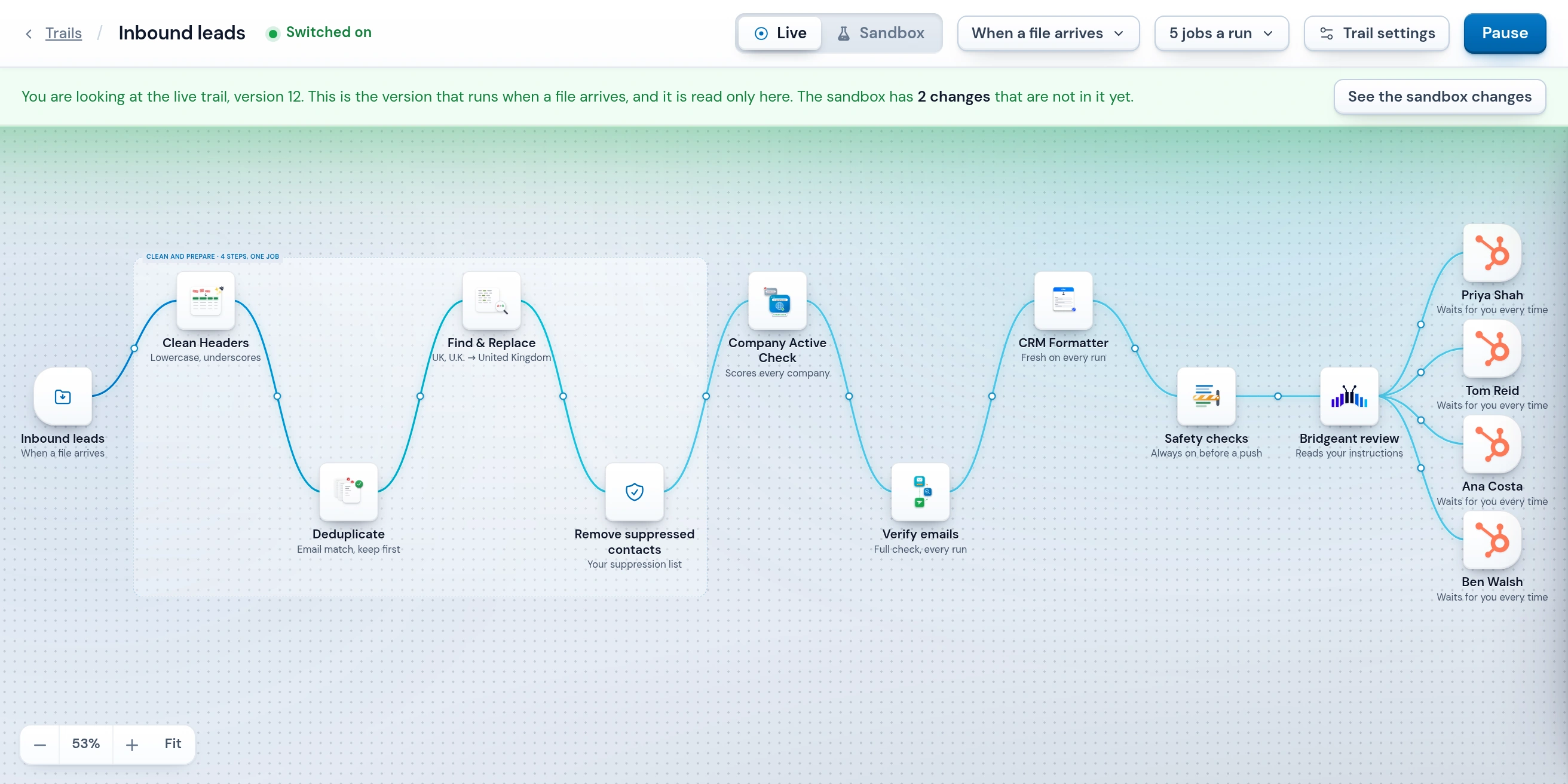
Automated lead flow, without the drop in data quality.
A trail picks up files from a folder, an inbox, or the API and runs when a file lands or at a time you set. Prove it in the sandbox first, with a free dry run or a test run that sends nothing, then put it live.
See how Trails workWhat automated lead flow changes
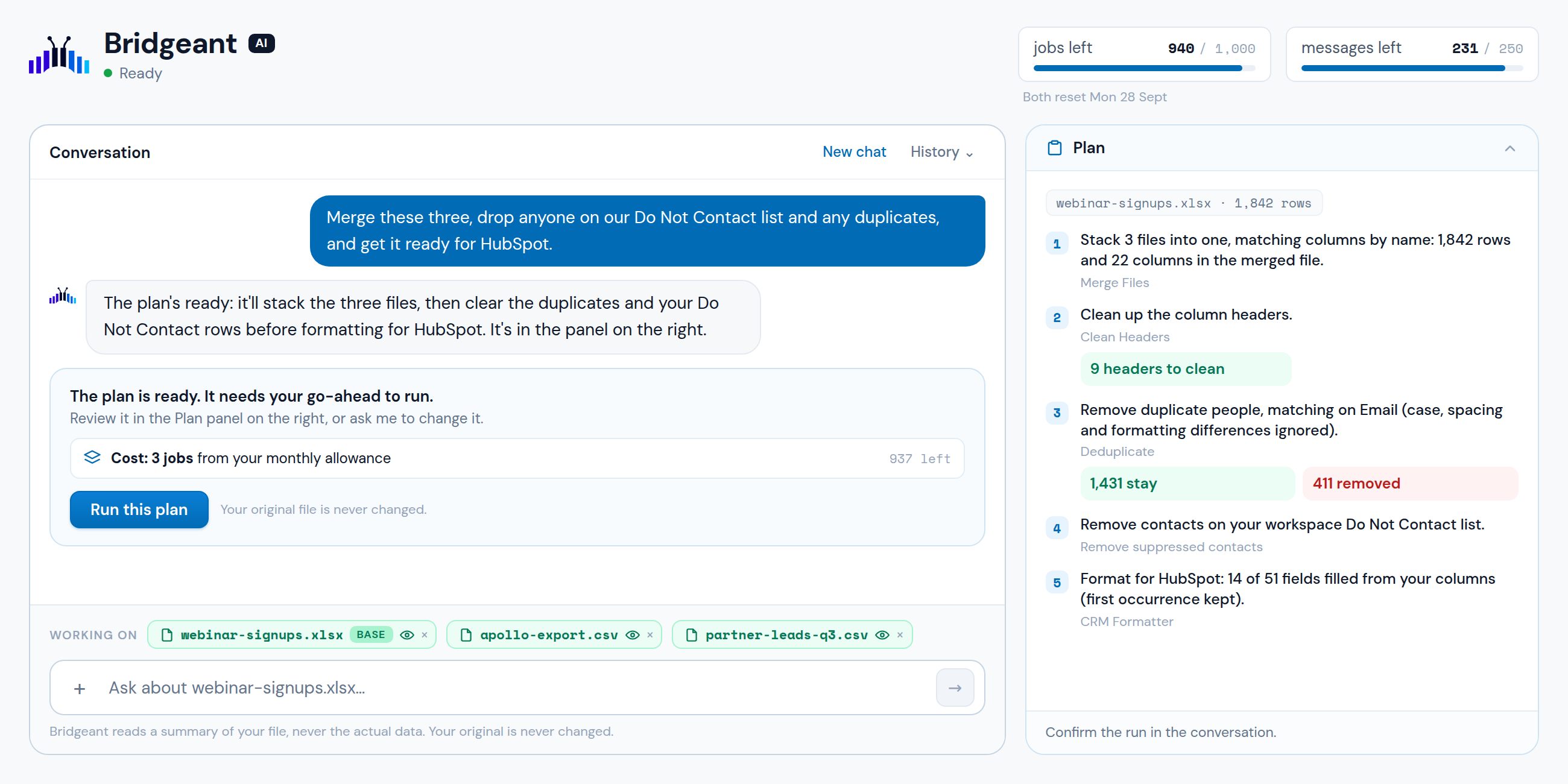
 Bridgeant
AI data prep, without handing over your data.
Type what you want done, the way you would ask a colleague. Bridgeant works out which tools to use and writes the plan out step by step, with what each one will do to your rows.
See BridgeantCompared with Excel, or a chatbot
 Clean Headers
 Deduplicate
 Merge Files
 Split File
 Find & Replace
 Filter & Extract
 Health Check
 Email Verifier & Finder
 Company Active Check
 Match & Pull Columns
 Column Manager
 Transpose / Unpivot
 Compare Files
 Excel to CSV
 CSV to Excel
 CRM Formatter
 Workflow Builder
The hard spreadsheet jobs, without the formulas.
Upload a CSV or Excel file and pick the tool named after the job. Before it runs you see what will change. The result is a new file, and your original stays as it was.
See all toolsWhy not just do it in Excel
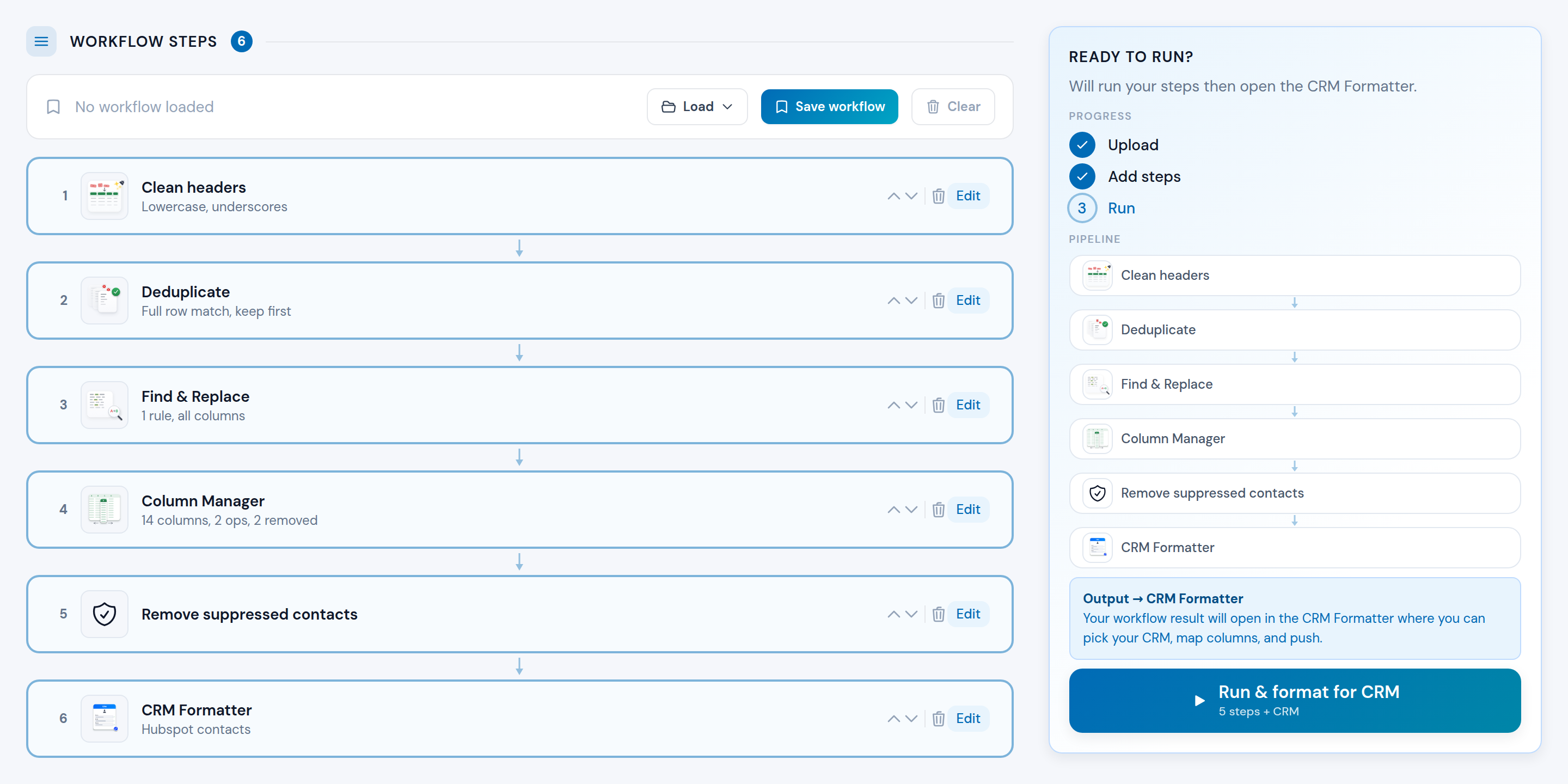
One pass through every tool, in the order you set.
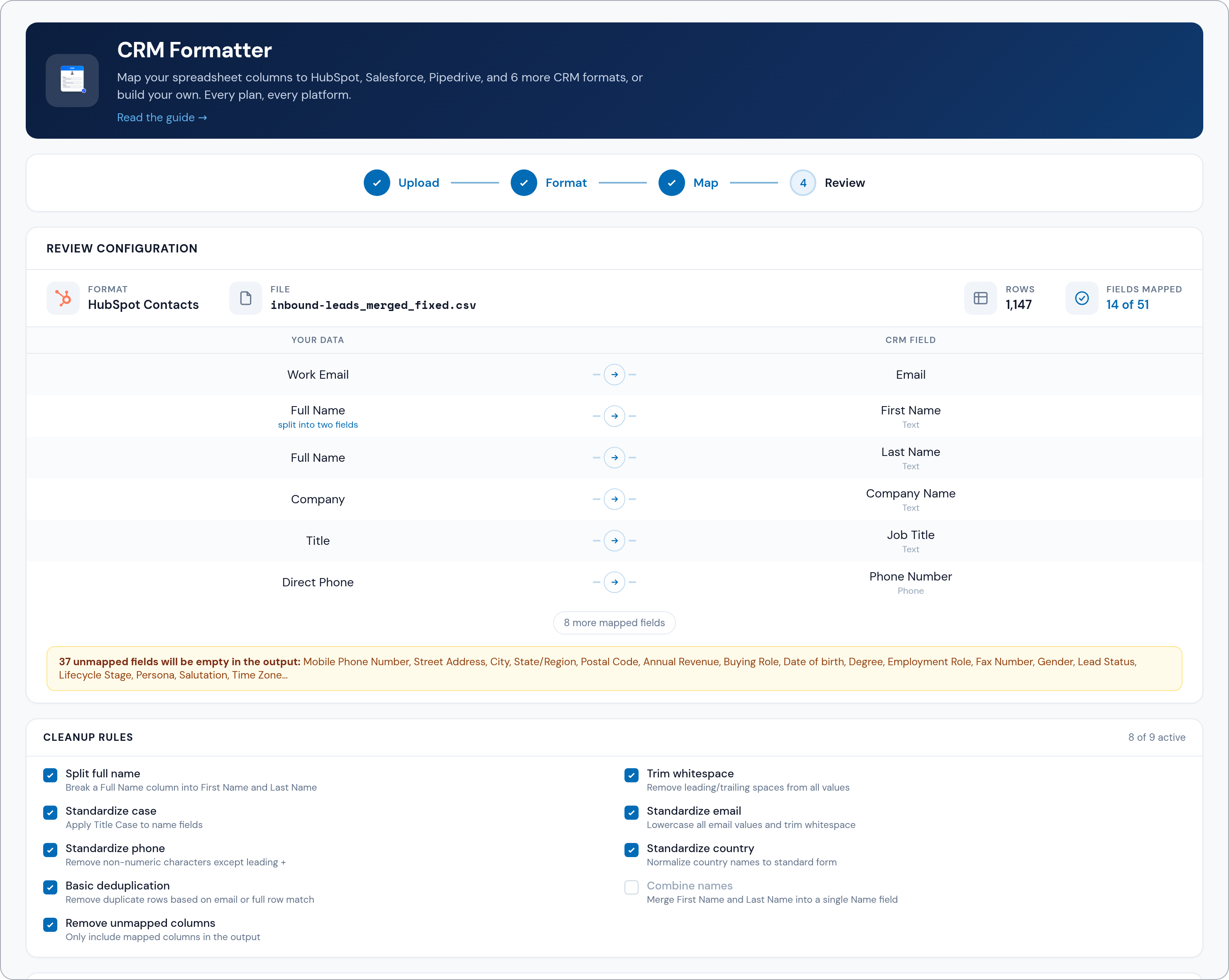
Pick the tools and run them once. The CRM Formatter goes last, so the run finishes in the mapping screen, not in your downloads folder.
See the Workflow BuilderWhat a workflow adds
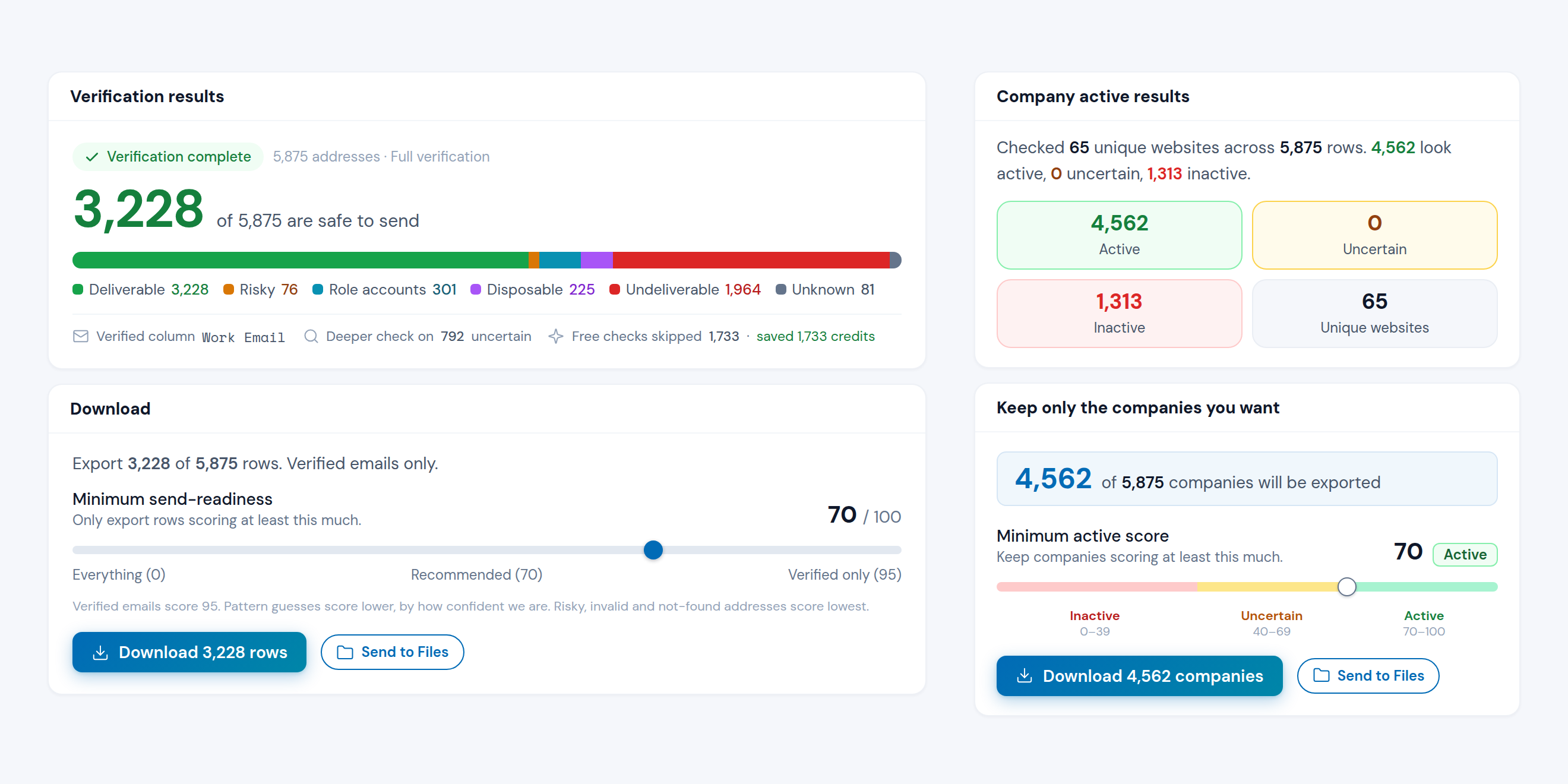
Dead addresses and dead sites, out before the import.
Addresses that cannot receive mail are removed first, then the rest are confirmed with the provider and the uncertain ones are checked again. Your sending tool is never the thing that finds a dead address.
What the checks give you
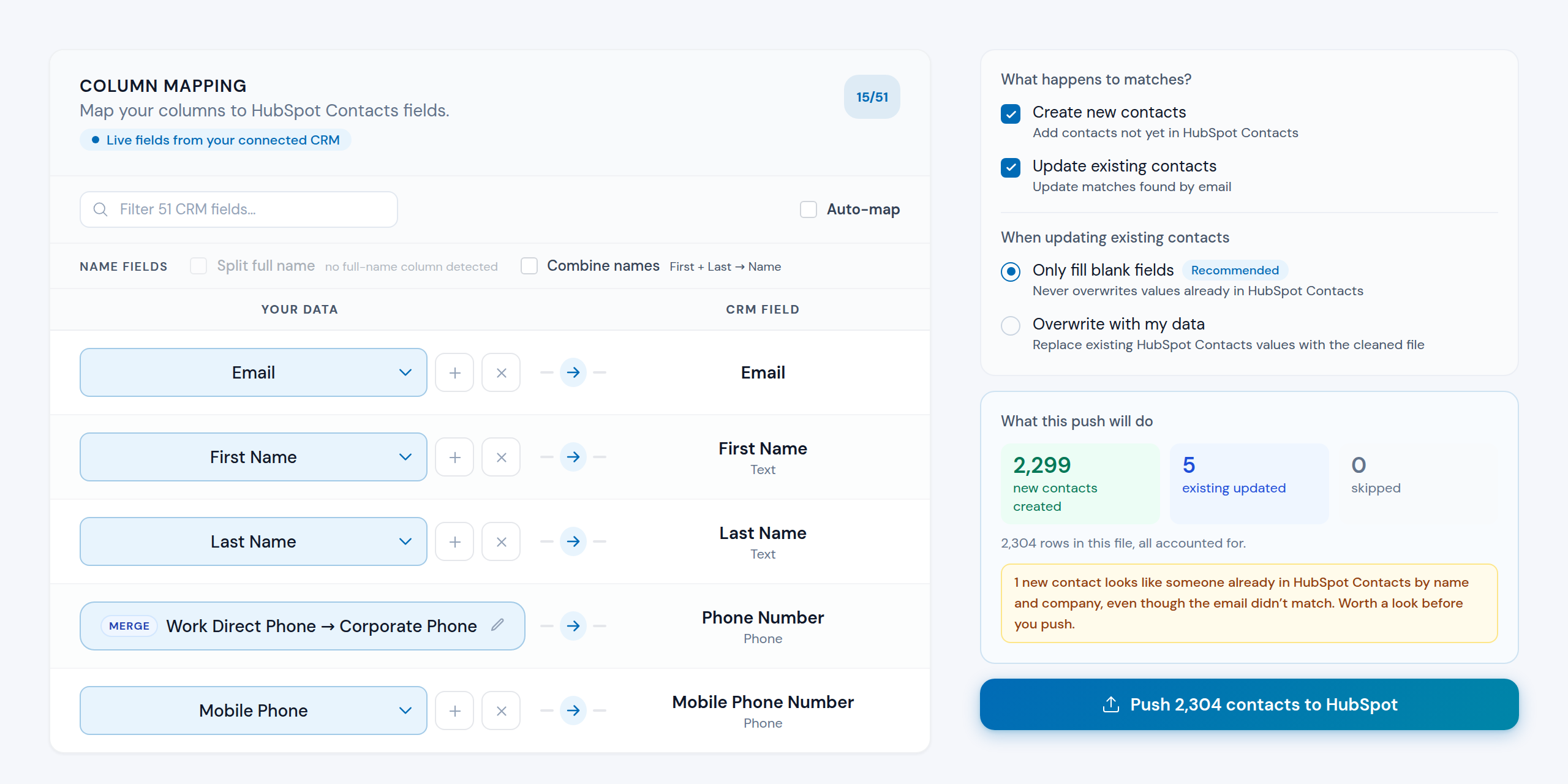
Use this instead of your CRM's own importer.
Map onto HubSpot, Salesforce or Pipedrive fields, custom ones included, then read what the push will do before you confirm. Other CRMs get a formatted file.
See the CRM FormatterWhat happens before the push
Built for you
Different departments, same work.
RevOps and CRM managers, sales and marketing teams, founders doing all of it themselves, and agencies doing it for their clients. It comes down to the same four things: automated cleanup, email verification, lead routing and CRM imports.
You have six places leads come from, and no single place they go through.
Apollo one way, the webinar list another, the events file by hand. Each cleaned by whoever got to it, mapped how they saw fit, and your CRM takes all of it. Then routing and reporting inherit every bit of it.
You put one layer in front of the CRM. Every source lands there first and comes out the same shape: deduped, verified, mapped to your fields, routed to the right rep. Build it once, and anyone can run it or leave it to run on its own.
See how trails work










 Operelio
What you get
You add 500 more to the campaign, and now you're checking them against the first 1,000.
Dedupe the new batch against the old one, work out who is already in there, then fix the ones whose details have changed. Miss one and the same person sits in your CRM twice, on two different sequences.
You keep the whole campaign in one file and push it again. Everyone already in the CRM is matched and updated, everyone new is created, and you see which is which before it runs. Nothing has to be fixed inside the CRM.
Read the guideWhat you get
Your CRM's importer is about to reject half your file.
Required fields it rejects, duplicates it creates by the hundred, and rows it drops without telling you. You find out once it's already in.
You get a report of what the push will do before you run it: what gets created, what gets updated, which rows your CRM will block, and every existing value an overwrite would replace. Then you decide.
Read the guideWhat this push will do
2,290 rows in this file, all accounted for.
- 61 with no email, so they can't be matched.
- 33 already have a value in every field this push would fill.
- 12 with an email that appears earlier in the file, so only the first of each is sent.
What you get
The mess isn't in the next import. It's already in your CRM.
Years of half-filled records, inconsistent formatting, and duplicates nobody's had time to sort. Reporting's off, and no one trusts the fields.
You export what's in there, and the file tells you what the CRM cannot: which addresses have gone dead, and which records are duplicates. Formatting gets standardized across every row in the same pass. Then you push it back over the originals.
Read the guideYour CRMOperelioWhat happens to matches?
What you get
Everything wrong in the old CRM is about to become everything wrong in the new one.
A migration tool moves the records. It doesn't check whether the addresses still work, or whether two of them are the same person, so whatever was wrong arrives intact. By then the old CRM is off and there's nothing left to compare against.
Your export lands in Operelio first. Duplicates are found and removed, every address is verified, and only then is it mapped into the new CRM's fields. The cleaning happens during the move, not after.
Read the guideOperelioWhat you get
You pay for the names. Nobody tells you which ones are real.
No vendor covers your whole market, so you buy two or three and pay twice for the overlap. None of them mention how much of it is already dead: companies closed, addresses bouncing. Your reps find out one send at a time.
You run every source through one funnel. Together they cover more of your market than any one of them can, and the same pass strips out the overlap, the companies no longer active, and the addresses that bounce.
Read the guideApolloZoomInfoCognismLushaWhat you get
The leads landed this morning. Your reps get them once you have finished sorting.
Work out who is owed what, split the file, send everyone their slice, then watch half of it get imported wrong. By the time a rep dials, the lead is a day old and nobody is sure whose it was.
You say once who the leads belong to: round robin between the team, one owner, or whoever the file names. Every batch after that is routed automatically, with the owner set on each record as it lands.
See how trails workEach row stamped with its owner, assigned on the pushWhat you get
The list looks fine right up until you send to it.
Your audience sits across five lists, and not one of them tells you which addresses still work or who asked to be left alone. Send it anyway and the bounces land on the domain you send from.
You put the lists together and every address is checked before the send. The ones that bounce or have gone missing are rebuilt and verified, and anyone on your Do Not Contact list is held out of it.
Read the guideMailchimp audienceActiveCampaignWhat you get
The webinar ends, and the leads are already going cold.
The registration list, the attendee report, scans from the booth, a co-host's file. The same person is in two of them, half the scans are mistyped, and nobody can follow up until it is one list.
You put every export in at once. The duplicates collapse, the mistyped addresses are checked and rebuilt, and the list comes back split by who actually turned up.
Read the guideWhat you get
You paid for every form fill, and most of them will never buy from you.
Ads bring in whoever fills the form: students, job hunters, a competitor, a two-person shop. Checking the address tells you it is real. It does not tell you the person can buy, and your reps find that out one call at a time.
You write your buyer down once as rules, and they read job titles, industries and headcounts the way a person would. Every batch is split against them, and the ones that do not fit are kept in a second file rather than thrown away.
See how it worksWhat you get
You clean data for a dozen clients, and none of it can mix.
Separate logins, scattered files, and the same manual cleanup for every client, every month. Every new client adds hours, not margin.
You run a workspace per client, so files and CRM connections never cross. Templates, mappings and workflows are shared across all of them, and credits come from one pool you can cap per client.
See Operelio for agenciesHubSpot contacts map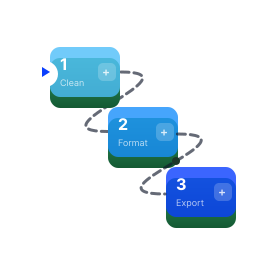 Weekly list cleanupHubSpotSalesforcePipedrive
What you get
You work the leads in your CRM, and the results have to land in a dozen others.
Export the wins, reshape them to that client's fields, email a file for someone else to import. Then do it again next week, for every client. The alternative is a connector per client, a long setup each time and a developer when it does not fit.
Your client approves a standard connection to their CRM once, the same screen they would see connecting any app. You map their fields once, and after that every push lands in their CRM, assigned to the person on their side who picks it up.
See how delivery worksOperelioWhat you get
You're the founder, the marketer, and the data cleaner, all before lunch.
Every new list means working out the import again: what maps where, what to strip, what to check. A CRM manager would do it the same way every time. You're working it out while running everything else.
You don't have to learn the job. Upload the list and it comes back cleaned, verified and mapped to your CRM, with new leads sent to whoever works them.
See how trails workWhat you get
You're cleaning the list in Excel, and the duplicates it missed are still in there.
Remove Duplicates catches the exact ones, so Ltd and Limited both stay, and you read the rest yourself. VLOOKUP needs both spellings to match, so a column of #N/A comes back and you fix those by hand too.
Set how close counts as the same row, and it catches the near misses. Pull a column across and the spellings don't have to match either. Merging, splitting, comparing and the rest are each their own tool.
Browse the tools=VLOOKUP(TRIM($A2),[accounts.xlsx]Contacts!$A:$D,4,FALSE)Match & pull columnsWhat you get
Every customer sends their data in a different shape, and you're the one who has to take it.
Writing the parser, the validation, and the dedupe is weeks of work that isn't your product, and it breaks the moment a new format shows up.
You define your CRM's shape once as a template. After that the API takes a raw file, cleans and dedupes it, maps it to your fields, and hands back a file your own importer can take.
Read the guidecurl -X POST https://operelio.com/api/v1/jobs \
-H "Authorization: Bearer op_your_api_key_here" \
-H "Content-Type: application/json" \
-d '{
"inputFileId": "a1b2c3d4-e5f6-4a7b-8c9d-0e1f2a3b4c5d",
"toolType": "crm_formatter",
"configJson": {
"schemaName": "__custom__",
"mappings": { "Email Address": "email" }
}
}'
# -> { "id": "f0e1d2c3-b4a5-...", "status": "queued" }
# poll, then GET /files/{outputFileId}/download for the rowsWhat you get
The system around your lead flow.
Contacts land as spreadsheets, every week, from everywhere. Who on the list you must never contact. What was done to which file, and when. How the next one gets in without anyone uploading it. Whether the person you handed it to has started. The tools clean and verify each file. These four support the flow.
Nothing goes out that shouldn't
Screen every row against your own list on email, phone, company or website domain, or block whole countries, with a one-click OFAC sanctions preset. Set it once and the CRM Formatter screens against it by default. Trails, workflows, the Email Verifier and Bridgeant use it when you add it or switch it on. In the CRM Formatter, whatever it removes comes back in its own file, with the reason.
How suppression worksEvery file keeps its history
Every tool writes a new file, so the list you uploaded stays exactly as it was. Each result stays attached to it as a version, in order, with what that step did to the row count. Come back days later and you can still see what a file is, where it came from, and carry on from any version.
See the files libraryConnects to what you already use
Drop a file in a folder, email it to that folder's own address, or POST it to the API. A trail picks up what lands and runs on its own. It ends in a push to HubSpot, Salesforce or Pipedrive, or a formatted file for five more CRMs. Pushes wait for your approval by default.
See how trails work
You can see if it got done
Hand a file to someone with a note and a due date, and it reaches them in the app and by email. You see what is open and what is late. The file's own history shows every step taken on it, who did it and when, so a hard file and an untouched one stop looking the same.

Secure. Private. In your control.
Your team uploads real customer lists. Every file is encrypted, each workspace is walled off, and the AI never reads a row.
- Encryption
TLS 1.2+ in transit, encryption at rest, AES‑256‑GCM for CRM tokens
- Access control
MFA, SSO on Enterprise, admin and member roles, a workspace per client on Agency
- AI privacy
A summary of headers and counts, never your rows, and every AI feature can be switched off
- Data privacy
Never sold, never used to train AI, never shared with advertisers or data brokers
- Audit trail
Who ran what on Pro and Agency, version history on saved files, what the AI saw
- Compliance
GDPR, UK GDPR and CCPA, a DPA from signup, named sub‑processors, EU file storage
Common questions
Asked before starting.
Is my data safe?+
Operelio is built for GDPR and CCPA: your files are stored and processed in the UK and the EU, and our Data Processing Agreement applies automatically from the moment you sign up. Your files stay yours: nothing you upload is sold or used to train a model, and you can delete your data at any time. Bridgeant, the AI, plans jobs from a short summary of your file, sent to OpenAI in the US, and never reads the actual rows.
Read the security overviewWill pushing overwrite what's already in my CRM?+
Not unless you ask it to. By default, updates only fill fields that are empty in your CRM and leave existing values alone; overwriting mapped fields is a separate option you have to switch on. Either way, you see a preview of exactly what will be created, updated, or skipped before anything lands, and the push itself is a button you press. A trail that runs on its own holds its push for review too, unless you choose to let clean runs go straight through.
See how CRM push worksWhich CRMs does it work with?+
Operelio formats files for 8 major CRMs. HubSpot, Salesforce, Pipedrive connect directly for push, for people and companies alike: HubSpot contacts and companies, Salesforce contacts, leads and accounts and Pipedrive people and organizations. The rest get a CRM-ready file matched to their import format, and custom templates cover an in-house CRM.
Do I need a CRM to use it?+
No. Every tool returns a regular file, so plenty of people use Operelio purely for spreadsheet work: convert between Excel and CSV, clean headers, deduplicate, merge, split, filter, compare files, and download the result. The CRM side is there when you want it, never a requirement.
Browse the toolsDoes it handle workbooks with multiple tabs?+
Yes. Every tool reads the tab you choose (the first by default). Beyond that, you can combine a workbook's tabs into one list with an optional Source Tab column, match or compare between two tabs of the same workbook, and split a clean list back into a tab-per-group workbook. Bridgeant can run the whole loop, like removing duplicates across every tab while keeping the workbook's shape, in one ask.
Read the multi-tab guideWhat does the free plan include?+
15 of the 17 tools, with no paid-only features in them, 5 jobs a month, and files up to 2,000 rows. No credit card required. Paid plans raise the limits and add direct CRM push, saved workflows, and deep email verification.
Compare the plansHow big can my files be?+
Free handles files up to 2,000 rows, Starter up to 50,000, Pro up to 75,000, and Agency up to 150,000 rows in a single job. Every plan takes both .xlsx and .csv, and nothing runs on your machine, so big files don't slow it down.
Do I need to be good at Excel?+
No. There are no formulas anywhere: every tool is named after the job it does, and each option says what it does. If you'd rather not pick tools at all, describe the outcome to Bridgeant and it lays out the steps for you.
Meet BridgeantReady when you are
Clean data in minutes, not hours
17 tools, 168 templates, and a free tier that actually lets you work. Upload a file and see the difference in under a minute.