
Free plan, no card required
Format your CSV for HubSpot or Salesforce
Upload a file, pick a CRM, and Operelio maps your columns for you. Direct push to HubSpot, Salesforce, and Pipedrive.
No credit card required.
Format for 8 major CRMs, direct push to 3



 Zoho CRM
 Monday.com
 Freshsales
 Close
Close Copper
Not on the list? Use the built-in Generic format or build your own custom template with any field names and types.
Features
Map, clean, validate, push.
Map
Auto column mapping
Upload a file and Operelio reads your headers, then matches them to the right CRM fields. Handles variations like "First Name", "first_name", "fname", and "given_name" with little or no manual work for well-named columns.
167 source-to-CRM templates
Pre-built mappings for every major source platform (LinkedIn, Mailchimp, Shopify, ActiveCampaign, Constant Contact, and more) plus CRM-to-CRM migrations. Pick a template, upload, go.
Merge fields
Combine multiple source columns into one target field with a custom separator. Useful when your source has separate first/last name columns but your CRM wants a single name field.
Clean
Each rule is toggleable. Defaults are sensible; override any that don’t fit.
Email & phone standardization
Emails are lowercased and trimmed to match CRM format requirements. Phone numbers are stripped of brackets, dashes, dots, and spaces while keeping the leading + for international codes.
Name splitting & casing
"John Smith" in a single column becomes separate first and last name fields. Handles "Smith, John" and multi-word names. Names are title-cased. Abbreviations like CEO, VP, and LLC stay uppercase.
Country normalization
"UK", "GB", "Great Britain", and "england" all become "United Kingdom". Covers 80 countries with their abbreviations, ISO codes, and common misspellings.
Validate
Deduplication
Duplicate rows are detected by email address (or full-row match if no email column) and removed before export. No duplicates in your CRM import.
Do Not Contact exclusion
On a paid plan your Do Not Contact list is applied before the push, so suppressed people never reach your CRM. Block by email, phone, domain, company or country. Costs no credits.
Format checks & error flagging
Every row is checked before export. Emails missing an @ sign, required fields left blank, and phone fields without digits are flagged. You review everything before it touches your CRM.
Required-field warnings
If a required CRM field has no source mapping or is blank in any row, Operelio flags it before export. You see exactly which rows need attention.
Push
Saved mappings
ProSave your column mapping, cleanup settings, and merge field config together. Next time you get a file from the same source, load the mapping and run it without re-mapping for typical files. Up to 25 on Pro, 150 on Team, 300 on Agency.
Custom CRM templates
ProDefine fields, types, and required flags. Email and phone fields are cleaned and validated; other types are stored as you enter them. Up to 5 on Pro, 25 on Team, 75 on Agency.
Direct CRM push
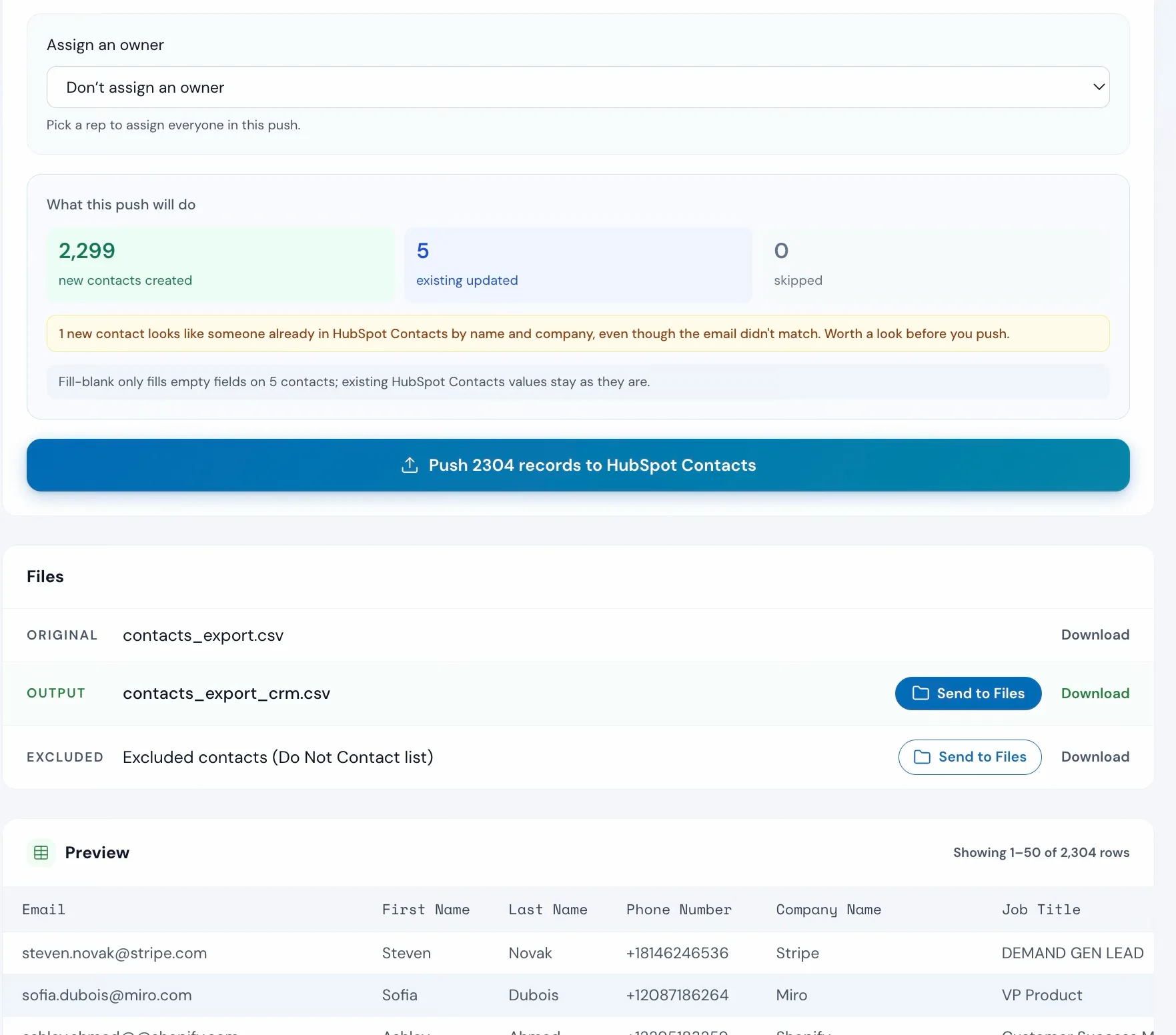
ProConnect HubSpot, Salesforce, or Pipedrive and push validated records directly from Operelio. Each push creates new records. Operelio doesn’t update existing records, and there are no CSV uploads.
How to use it
Four steps from file to CRM
Upload your file
Drag and drop any CSV or Excel file. For a workbook with several tabs, the first tab is used. Operelio reads the column headers for you.
contacts_export.csv
9 columns detected
Pick your target CRM
Choose one of eight CRM platforms and map columns yourself, use a Quick Import template if your file comes from LinkedIn, Mailchimp, Shopify, or another known source, or define your own custom template. Templates are a shortcut, not a requirement.
Quick Import
Review mappings and toggle cleanup
Click any row to change a mapping. Toggle cleanup options on the right. Each one is explained in the column mapping guide.
Export or push to CRM
Get a file your CRM will accept on first import. Or connect HubSpot, Salesforce, or Pipedrive and push records directly without downloading anything. Each pushed record gets a CRM-returned ID logged in your job results so you can audit the import.
The alternative
Doing it yourself
This is what a CRM import looks like without Operelio.
The Manual Way
2-3 hours per import
Repetitive. Error-prone. Someone still has to redo it when the CRM rejects half the rows.
With CRM Formatter
A few minutes per typical import
Save the mapping and next time a typical run takes seconds. Anyone on the team can run it.
Pricing
Free to start. Pro, Team, and Agency add the full toolkit.
Free plan: every CRM format and object type, up to 2,000 rows, three jobs per month, CSV download. Pro from $39/month, Team from $99/month, or Agency from $299/month: direct push to HubSpot, Salesforce, or Pipedrive, saved mappings, custom templates, bigger files, and more jobs.
FAQ
Common questions
Does the CRM Formatter work with my CRM?
There are built-in formats for eight CRMs: HubSpot, Salesforce, Pipedrive, Zoho CRM, Monday.com, Freshsales, Close, and Copper, on every plan including Free. For anything else, pick the Generic format or build a fully custom template with your own field names and types. Direct push works for HubSpot, Salesforce, and Pipedrive. For the other five CRMs you download a formatted CSV and import.
I have a LinkedIn export. Can I just upload it?
Yes. Pick the Quick Import template for your source (LinkedIn Sales Nav, LinkedIn Connections, Apollo, ZoomInfo, Cognism, Lusha, Mailchimp, Shopify, Google Contacts, Outlook, Stripe, WooCommerce, ActiveCampaign, Constant Contact, Squarespace, Wix, Eventbrite, Calendly, Typeform, Intercom, and more), choose your target CRM, and the columns map across. 167 templates are available.
Do I have to map every column myself?
No. Operelio reads your column headers and auto-matches them to CRM fields. It handles common variations like "First Name", "first_name", and "fname". You can adjust any mapping it gets wrong, but most files need little or no manual work.
Can I push records straight into my CRM?
Direct push is available for HubSpot, Salesforce, and Pipedrive on Pro, Team, and Agency plans. Connect your account, run the formatter, and push validated records without downloading a file. For the other five platforms, you download a formatted CSV and import through your CRM.
What does it do to clean up my data?
Emails are lowercased and trimmed. Phone numbers are stripped of brackets, dashes, dots, and spaces (leading + is kept). Names are title-cased and split into first/last. Comma format ('Smith, John') is handled, and abbreviations like CEO, VP, and LLC stay uppercase. Duplicates are removed by email. Country values are normalized covering 80 countries. You can toggle each option on or off.
Can I reuse the same setup for repeat imports?
Yes. Save your column mappings, cleanup settings, and merge field config together. Next time you get a file from the same source, load the saved mapping and run it without re-mapping for typical files. Pro plans support up to 25 saved mappings, Team plans up to 150, and Agency plans up to 300.
What does the free plan include?
Free includes every CRM format and every object type (contacts, companies, leads, organizations), up to 2,000 rows and three jobs per month, with CSV download. Pro ($39/month), Team ($99/month), and Agency ($299/month) add direct CRM push, saved mappings, custom templates, bigger files, and more jobs.
What happens if my file has bad data?
Rows with problems are flagged as warnings: emails missing an @ sign, blank required fields, phone fields without digits. You review everything before downloading or pushing. Nothing gets silently dropped or rejected.
My source has separate first and last name columns but my CRM wants one name field. Can it handle that?
Yes. Merge fields combine multiple source columns into one target field with a separator you choose. Many of the built-in templates already include merge field configs, so this often needs no extra setup.
Is my data secure?
Files are processed on encrypted servers and deleted after the retention window for your plan: 1 day on Free, 30 days on Pro and Team, 90 days on Agency. You can delete files manually at any time. OAuth connections never give Operelio your CRM password. Read the full security policy
Pair with
Health Check
Score your file before mapping
Clean Headers
Tidy column names first
Deduplicate
Remove duplicate rows
Workflow Builder
Run all three in sequence
Suppression lists
Drop Do Not Contact matches first
Stop renaming columns.
Start pushing data.
Free plan, no card required. Pro, Team, and Agency add direct push from $39/month.