
Free: keep all rows · Pro: more matching modes
VLOOKUP between two files, without the formula
The online VLOOKUP, for whole files
Match contacts to companies, enrich a CRM export with revenue, or merge sign-ups with billing data. Everything Excel's VLOOKUP does, with no formulas, no broken cell references, no copy-paste.
No credit card required. Basic matching included free.
What it does
Match rows across two files
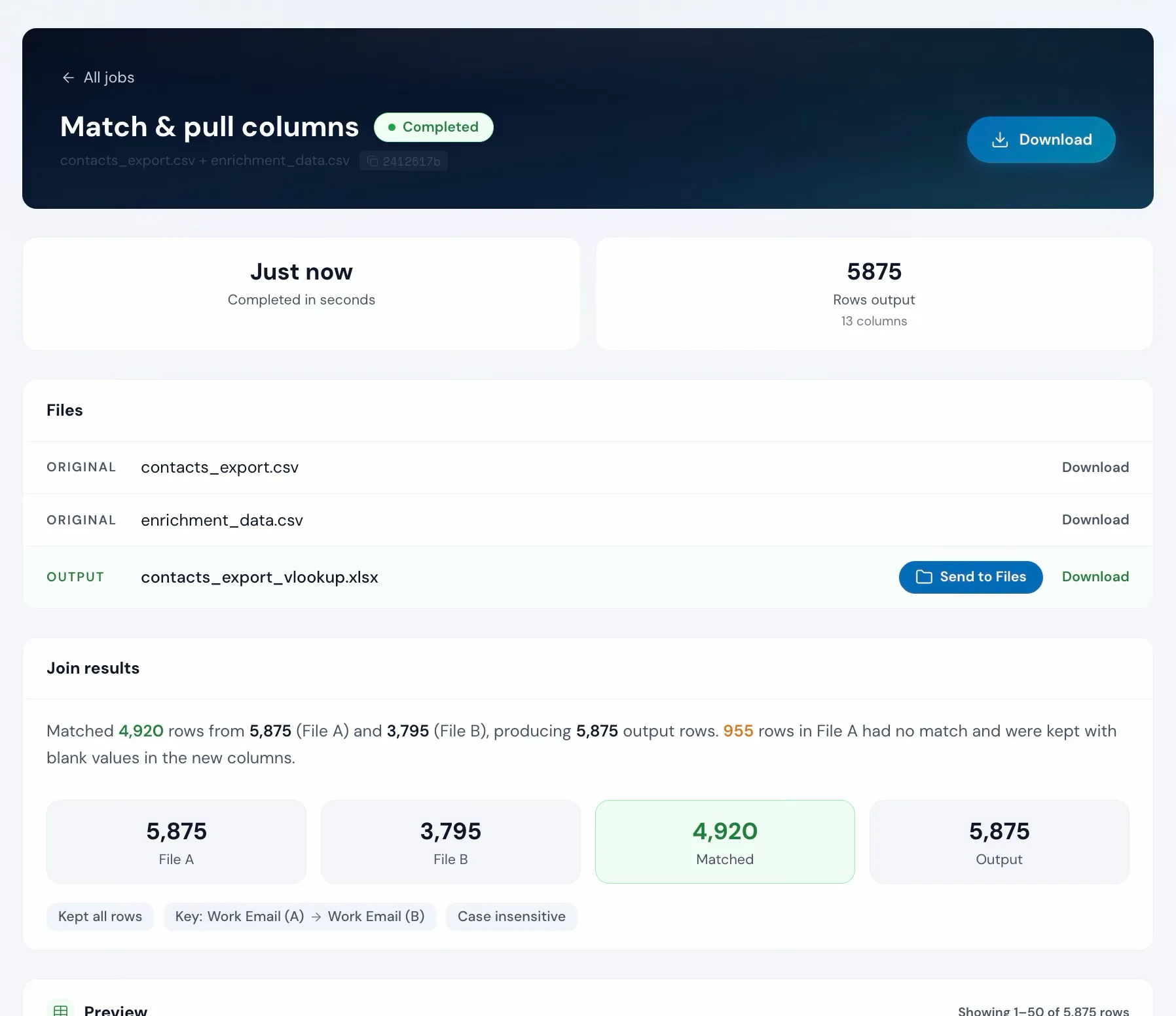
Say you have a list of contacts and a list of companies, both with an email column. Operelio takes your primary file (the contacts) and your lookup file (the companies), and uses email to combine them into one file.
Keep all rows
Every contact stays in the output. Where there's a match, the extra data is added. Where there isn't, those columns stay blank.
Only matching rowsPro
Drop any contact that doesn't have a match in the lookup file. Useful when you only care about the contacts you can enrich.
All rows from both filesPro
Keep everything from both files. Rows that didn't match are still included, with the missing side left blank.
Match on multiple columnsPro
Use first name and last name together, or email and company. Useful when there are duplicate names in your data.
Catches typos and small differencesPro
"Meridian Supply" still matches "MERIDIAN SUPPLY CO". Operelio finds the match even when the spelling is slightly off. (Capitalization and extra whitespace are handled on Free.)
Choose which columns to pull
By default, every column from your lookup file is added to the output. Pick just the ones you want if you only need a few.
How to use it
Two files in, one combined file out
Upload two files
Drop your primary file (the one you want enriched) and your lookup file (the source of the extra data). CSV or Excel both work, and you can mix them.
Pick the shared column
Pick the column that appears in both files, like email or customer ID. That's how Operelio knows which rows go together.
Shared column
Keep
Download the combined file
Click Run. Operelio combines the files quickly. Download the result as CSV, or as Excel on Pro.
The alternative
Doing it yourself
This is what joining files looks like without a tool.
With Excel formulas
10-30 minutes per lookup
Formulas break when columns move. Slow on large files. Can't catch typos. One column at a time.
With Operelio
Under 30 seconds
Matches by column name, not position. Pulls all columns at once. Handles thousands of rows without slowing down.
A missing column might not be the only problem in that file
Upload it and Bridgeant reviews the file before you commit to a tool. It reports what it finds, orders the problems by how much they actually matter, and points you at the tool for each one. That is on every plan including Free, and it works from a summary of your file rather than the contents.
On Pro and up it stops advising and starts doing. Describe the job in a sentence and Bridgeant plans the steps, shows you the plan, and runs them in the right order once you approve. You are not running four jobs by hand and trying to remember which came first.
See how Bridgeant worksPricing
Basic matching is free. Pro adds more.
Pay monthly, or save 25% with annual billing (billed once for the year).
Free
$0
Keep all rows, match on one column, up to 2,000 rows.
Pro
$39/month
or $351/year (effective $29.25/month, 25% off)
More matching modes, multi-column keys, typo-tolerant matching, Excel output, up to 50,000 rows.
Team
$99/month
or $891/year (effective $74.25/month, 25% off)
Everything in Pro for teams: 5 seats, shared workspace, up to 75,000 rows.
Agency
$299/month
or $2,691/year (effective $224.25/month, 25% off)
Everything in Pro at scale, up to 150,000 rows, API access.
Common questions
Match & pull columns FAQ
What are the different matching modes?
"Keep all rows" (the default, free) keeps every row from your primary file and adds matching data from the second file. "Only matching rows" (Pro) drops anything that doesn't match in both files. "All rows from both files" (Pro) keeps everything, filling blanks where there's no match.
How do I VLOOKUP between two sheets or two spreadsheets?
If the two lists are tabs of the same workbook, upload the one workbook and choose a tab as File B: no saving tabs out as separate files. With two workbooks, upload both; each file card has a tab picker so you control exactly which tab each side reads (the first tab by default). Then pick the key column they share, choose the columns to pull across, and download the joined file. No formula, no column numbers, no #N/A errors.
How is this different from VLOOKUP in Excel?
Excel VLOOKUP matches one cell at a time and requires you to specify the column by number. Operelio matches by column name, pulls all selected columns at once, and handles thousands of rows without formulas. Pro also offers similarity matching for typos and inconsistent values.
What is similarity matching?
Similarity matching finds matches when values are similar but not identical. For example, "Meridian Supply" and "Meridian Supply Co" would match. You set a threshold between 50 and 99 to control how close values need to be. Available on Pro.
Can I match on more than one column?
Yes, with Pro. Multi-column matching lets you match on two or more columns at once (e.g. first name and last name together). The column count must match between the two files.
What happens when both files have a column with the same name?
By default, the lookup file's column gets a _B suffix (e.g. "status" becomes "status_B"). You can also choose to overwrite the primary column or skip the duplicate.
Is the key matching case-sensitive?
Not by default. Matching is case-insensitive and whitespace is trimmed, so "John Smith" and "john smith" will match. You can turn case sensitivity on if needed.
Works well with
Want the full walkthrough? Read the Match & pull columns guide →
Stop writing VLOOKUP formulas.
Upload two files, pick the shared column, and download the combined result. Free on every plan.